Add invisible watermarks and signed C2PA Content Credentials at the end of your ComfyUI workflow. Ariadne Mark provides free, open-source export nodes for images, native video and final saved files — with verification receipts and all three video profiles.
Generate → edit / resize / encode → Export with Ariadne → marked file + receipt
The extension is ariadne-mark-nodes 0.1.0, published by @ariadne-mark. It calls the existing Ariadne Mark SDK 0.7.3a4 in a separate process. Install the nodes once, connect your SDK kit once, then use an export node in each workflow.
What the ComfyUI nodes do
| Node | Connect it to | Export |
|---|---|---|
| Export Images with Ariadne | Final IMAGE tensors, including a batch |
Marked PNG files, embedded C2PA and receipts |
| Export Video with Ariadne | Native Create Video, codec none, with your final frames | A marked MP4 in Economy5s, Economy2s or Resilient |
| Mark Saved File with Ariadne | A final PNG, JPEG or MP4 inside ComfyUI input/output | A new marked file; the original bytes reach the SDK unchanged |
These are terminal export nodes. Download their saved output rather than sending it through another Save Image or encoding step. Later changes can remove Content Credentials or affect watermark recovery.
1. Install the extension from Comfy Registry
Open the Ariadne Mark Registry listing. In ComfyUI-Manager, look for the package ID ariadne-mark-nodes; a catalogue refresh may be needed for a newly published entry.
The following direct Registry installation was tested with the official Python Comfy CLI 1.26.0. Replace the workspace path with your actual ComfyUI folder:
comfy --workspace /absolute/path/to/ComfyUI --skip-prompt --no-enable-telemetry node registry-install ariadne-mark-nodes --version 0.1.0
This installs the extension, not the SDK runtime, watermark models or a signing identity. Continue with the kit setup below before running an Ariadne node. Ensure the extension's requirements.txt is installed in the Python environment that launches ComfyUI; the requirement is filelock, not another Torch installation.
For a manual installation, clone ComfyUI-Ariadne-Mark into ComfyUI/custom_nodes/, install its requirements using your ComfyUI Python, and restart. The adapter uses Comfy's native V3 extension API. The tested configuration is ComfyUI 0.45.0 on Linux x86-64, CPU marking; Windows, macOS and Comfy Cloud have not been qualified for this integration.
2. Connect your Ariadne SDK kit
Follow Build and initialize the deployment kit using the 0.7.3a4 release source and its checksums. Build the SDK Docker image, initialize a development kit for your first local trial and retain the image's immutable ID from ariadne-image.id.
Keep the kit outside ComfyUI's served input, output and temp directories. It holds the registry and signing material; it is persistent project state, not a disposable cache. Your own Docker image must be provisioned before node execution — the adapter does not download images or models while a workflow runs.
Download the adapter configuration example, save it privately, and replace both absolute paths and the image placeholder:
{
  "schema_version": 1,
  "kit_directory": "/absolute/private/path/to/ariadne-kit",
  "runner": {
    "kind": "docker",
    "command": ["docker"],
    "image": "sha256:REPLACE_WITH_YOUR_VERIFIED_LOCAL_SDK_IMAGE_ID",
    "network": "none"
  },
  "timeout_seconds": 900
}
Use the complete local sha256:… image ID, not a mutable tag. The Docker command must be usable by the account running ComfyUI. Set the config path in the environment that launches ComfyUI, then restart that process:
export ARIADNE_COMFY_CONFIG="$HOME/.config/ariadne-mark/comfy.json"
chmod 600 "$ARIADNE_COMFY_CONFIG"
# Launch your usual ComfyUI command from this same environment.
The offline development configuration above was tested. For production signing and timestamps, follow the production setup and configure permitted network access and your own credentials. Installing these nodes does not enroll a C2PA product or issue a production certificate.
3. Export a marked image
Download the image workflow JSON and open it with File → Open in ComfyUI. In Load Image, select your own newly generated image; the example fixture filename is a placeholder. Connect the IMAGE output to Export Images with Ariadne, or replace the loader with the final image output of your generator.
- Finish edits, cropping and resizing before the Ariadne node.
- Choose a
filename_prefix, such asmy_render. - Leave
created_at_utcblank to record when the node materializes the final rendition, or provide the actual earlier generation time with a timezone. - Run the workflow. The node displays the saved marked PNG and returns
files_json.
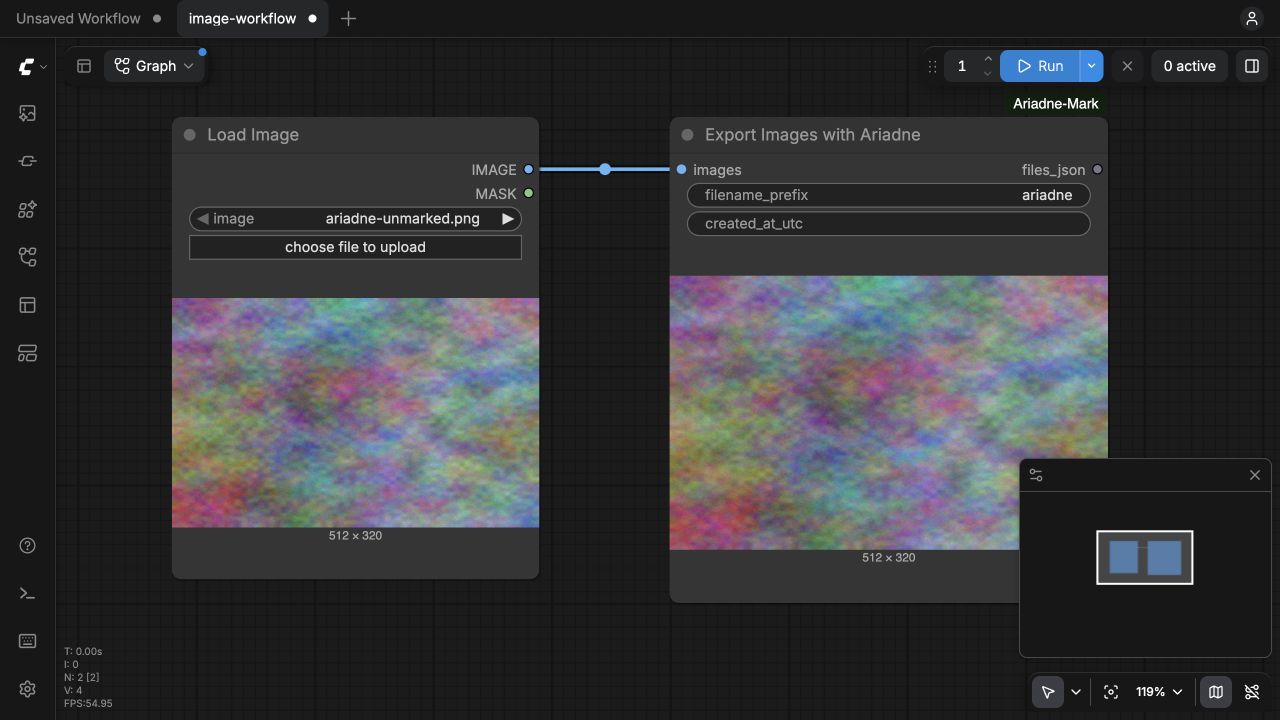
Generated image tensors may be RGB or RGBA, with 256–4096 pixels per side and up to 1,000 images in a batch. For an existing final JPEG, use Mark Saved File with Ariadne. Existing signed media remains subject to the SDK's upstream-history checks; this is not a way to replace another creator's provenance.
4. Export video and choose a watermarking profile
Connect your final frames to native Create Video, select codec none, then connect its VIDEO output to Export Video with Ariadne. Set audio_kind to none for silent video, or original for non-synthetic source audio. Generated speech and music are outside this visual-media workflow.
| Profile | Config value | Use it when |
|---|---|---|
| Economy5s — default | economy_5s |
Lower marking compute is the priority for your complete-file delivery workflow |
| Economy2s | economy_2s |
You want more frequent marked windows and can spend more compute |
| Resilient | resilient |
You want the denser marking profile and accept its higher CPU cost |
Read the profile selection guide and versioned recovery tests for complete files, trims and transformations. The extension preserves the SDK's profiles and defaults; it does not create a new compliance threshold or guarantee survival after every edit.
The native video node accepts 8-bit sRGB SDR, even dimensions of 256–1920 pixels per side, and at most 300 seconds / 18,000 frames. For an already encoded or file-backed video, finish the MP4 first and use Mark Saved File with Ariadne. This keeps the final file's bytes intact as they enter the SDK.
5. Download and verify the final file
The node publishes media and receipts under:
ComfyUI/output/ariadne/<prefix>_<job>/
  image_0000.png          # or video.mp4 / the saved-file export
  image_0000.png.receipt.json
  export.json
Download the exact saved output. Its SHA-256 should match the export receipt. Use your Ariadne verifier and registry, or the same provisioned SDK Docker image for an independent watermark read. For example, from the directory containing a downloaded PNG:
# IMAGE is the immutable ID of your already-provisioned SDK image.
docker run --rm --pull never --network none \
  --cpus 2 --memory 4g --user "$(id -u):$(id -g)" \
  --read-only --tmpfs /tmp:rw,nosuid,size=512m \
  -v "$PWD:/media:ro" "$IMAGE" \
  verify /media/image_0000.png --verification-scope current
Use the actual exported filename for video or another image. A valid development signature can still have an untrusted issuer; verification results explain the difference between a recovered ID, signature validity, issuer trust and file binding. A standard C2PA reader can also inspect the embedded manifest independently.
What was tested
The Registry-installed 0.1.0 package was exercised in a clean ComfyUI 0.45.0 checkout on Linux x86-64 CPU with SDK 0.7.3a4:
- 10 workflow cases met their expected outcomes: image, image batch, all three video profiles, a saved video, three expected failures and recovery after a failed SDK invocation.
- 8 exported files were downloaded through ComfyUI and matched their receipt hashes.
- A separate SDK process recovered the expected watermark ID and validated the development C2PA signature in all eight files.
Read the qualification summary, publication run and source repository. These are functional integration checks with procedural fixtures, not a new throughput or durability benchmark. The CPU measurements describe their own workloads and runtime conditions.
Common integration questions
Does watermarking need the same GPU as generation?
The qualified SDK runner uses CPU. It does not change your generation model's GPU configuration. The Docker runner is bounded to 2 CPU / 4 GiB, and its timeout is configurable. That memory limit is not a measured peak. Models are reused within one image batch, not across separate node executions.
What happens if marking fails?
The workflow raises an error and publishes no output for that adapter batch. It does not silently return an unmarked original. Check the private kit's job logs for missing configuration, a busy kit, receipt mismatch, timeout or SDK rejection. Keep keys and private logs out of public issues.
Does the node include a public verifier?
The nodes export files. The SDK deployment kit supplies a separately operated verifier and recovery registry. Your files are processed on your own infrastructure; the adapter does not upload them to an Ariadne service.
How does this help with AI labeling compliance?
It puts marking, signed provenance and export checks into the workflow you already use. Use the EU AI Act guide, California guide and requirements matrix to connect those technical measures to your product's duties and remaining actions.
Is the ComfyUI integration free?
The adapter is Apache-2.0 open source, with no per-export plugin fee. SDK and model components retain their own licences. Compute, hosting and any production signing/timestamp services remain your operating costs; see the cost guide.